
We are using Google spreadsheets to record our trapping results, links to which are included in every newsletter. (Because this website is public facing, we are not linking to the spreadsheets here.)
Interior Lines
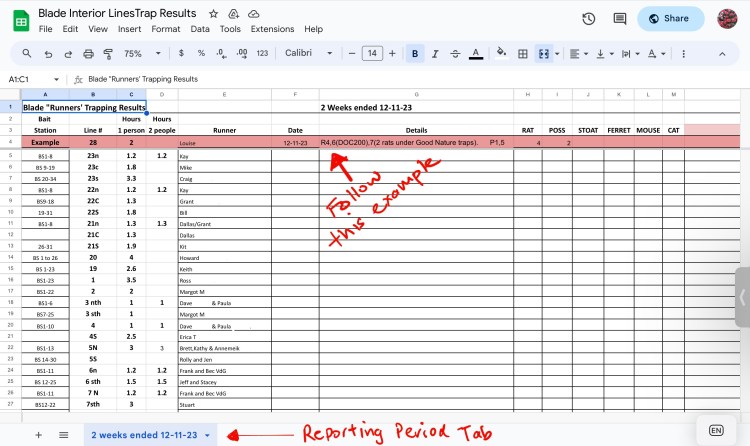
A pink example row will appear at the top of every results sheet, so no need to try to follow the small print in the image below, which is for illustration purposes only.
Here are a few other pointers:
• TRAP DETAILS: Please specify in the ‘details’ field any rats caught in traps other than Victors: For example: R4,6(DOC200),7(2 rats under Good Nature traps). Ditto other critters caught in the ‘wrong’ kind of trap.
• IF YOU CHECK SOMEONE ELSE’S LINE: Please change their name to yours in the results sheet under the ‘runner’ column when you enter the data. Just click on the cell containing their name and make the change.
• RECORDING HOURS: If you need to amend hours, or add in extra hours if you have another volunteer with you, please change the hours in columns C (for your own hours) and in D (for anyone extra).
Any questions, just email us at contact@friendsoftheblade.org.nz
AT220 Auto Traps
There are currently two spreadsheets for the AT220s that trappers need to fill out.
1. AT220 Results
Use this spreadsheet to record your kills. This is laid out to make it easier for data crunching. The ‘how to’ should be obvious, but email us if you have any questions.
UPDATE FEB 2026:
AutoTraps can be set off by wētā, moths, and other insects so in order to not overstate our AT220 rat kills, please do as follows:
For any trap showing 20 or more kills.
• Enter the kill number as recorded by the trap, but add a note to the ‘comment’ column either (i) that this number seems correct, based on rat remains around the trap and/or kills on nearby traps; or (ii) that the kill number is likely lower, based on few remains and lower kills on nearby traps. If you can estimate the more likely kill total for the trap based on remains, please add that.
For example, a trap showing 43 rat kills, where neighbouring traps recorded much lower numbers, and you saw evidence of perhaps 10 corpses, you might write: “43 too high based on remains and nearby traps. More likely 10.”
HOURS: please enter how many hours you spend checking the ATs alongside your kill results. You only need to make one entry for the hours beside each block of ATs you check.
2. AT220 Date Check Record
We are trialing this additional step as a way of making it easier to check which AT220s need checking, and which have been recently checked. Note the tabs along the bottom of the spreadsheet which group the AT220s make the sheet easier to manipulate and use.
 Friends of the Blade